Soldering filler materials are available in many different alloys for differing applications. In electronics assembly, the eutectic
alloy of 63% tin and 37% lead (or 60/40, which is almost identical in
performance to the eutectic) has been the alloy of choice. Other alloys
are used for plumbing, mechanical assembly, and other applications. Some
examples of soft-solder types and their applications include tin-lead
for general purposes, tin-zinc for joining aluminium,
lead-silver for strength at higher than room temperature,
cadmium-silver for strength at high temperatures, zinc-aluminium for
aluminium and corrosion resistance, and tin-silver and tin-bismuth for
electronics.
A eutectic formulation has several advantages for soldering; chief among these is the coincidence of the liquidus and solidus temperatures, i.e. the absence of a plastic phase. This allows for quicker wetting as the solder heats up, and quicker setup as the solder cools. A non-eutectic formulation must remain still as the temperature drops through the liquidus and solidus temperatures. Any differential movement during the plastic phase may result in cracks, giving an unreliable joint. Additionally, a eutectic formulation has the lowest possible melting point, which minimizes heat stress on electronic components during soldering.
Common solder alloys are mixtures of tin and lead, respectively:
Other common solders include low-temperature formulations (often containing bismuth), which are often used to join previously-soldered assemblies without un-soldering earlier connections, and high-temperature formulations (usually containing silver) which are used for high-temperature operation or for first assembly of items which must not become unsoldered during subsequent operations. Alloying silver with other metals changes the melting point, adhesion and wetting characteristics, and tensile strength. Of all the brazing alloys, brazing has the greatest strength, with silver solders not being substantially stronger than soft solder and having the broadest applications. Specialty alloys are available with properties such as higher strength, better electrical conductivity and higher corrosion resistance.
For many years, the most common type of flux used in electronics (soft soldering) was rosin-based, using the rosin from selected pine trees. It was ideal in that it was non-corrosive and non-conductive at normal temperatures but became mildly reactive (corrosive) at the elevated soldering temperatures. Plumbing and automotive applications, among others, typically use an acid-based (muriatic acid) flux which provides cleaning of the joint. These fluxes cannot be used in electronics because they are conductive and because they will eventually dissolve the small diameter wires. Many fluxes also act as a wetting agent in the soldering process, reducing the surface tension of the molten solder and causing it to flow and wet the workpieces more easily.
Fluxes for soft solder are currently available in three basic formulations:
Soft soldering is characterized by having a melting point of the filler metal below approximately 400 °C (752 °F), whereas silver soldering and brazing use higher temperatures, typically requiring a flame or carbon arc torch to achieve the melting of the filler. Soft solder filler metals are typically alloys (often containing lead) that have liquidus temperatures below 350°C.
In this soldering process, heat is applied to the parts to be joined, causing the solder to melt and to bond to the workpieces in an alloying process called wetting. In stranded wire, the solder is drawn up into the wire by capillary action in a process called 'wicking'. Capillary action also takes place when the workpieces are very close together or touching. The joint strength is dependent on the filler metal used. Soldering produces electrically-conductive, water- and gas-tight joints.
Each type of solder offers advantages and disadvantages. Soft solder is so called because of the the soft lead that is its primary ingredient.Soft soldering uses the lowest temperatures but does not make a strong join and is unsuitable for mechanical load-bearing applications. It is also unsuitable for high-temperature applications as it softens and melts. Silver soldering, as used by jewelers, machinists and in some plumbing applications, requires the use of a torch or other high-temperature source, and is much stronger than soft soldering. Brazing provides the strongest joint but also requires the hottest temperatures to melt the filler metal, requiring a torch or other high temperature source and darkened goggles to protect the eyes from the bright light produced by the white-hot work. It is often used to repair cast-iron objects, wrought-iron furniture, etc.
Soldering operations can be performed with hand tools, one joint at a time, or en masse on a production line. Hand soldering is typically performed with a soldering iron, soldering gun, or a torch, or occasionally a hot-air pencil. Sheetmetal work was traditionally done with "soldering coppers" directly heated by a flame, with sufficient stored heat in the mass of the soldering copper to complete a joint; torches or electrically-heated soldering irons are more convenient. All soldered joints require the same elements of cleaning of the metal parts to be joined, fitting up the joint, heating the parts, applying flux, applying the filler, removing heat and holding the assembly still until the filler metal has completely solidified. Depending on the nature of flux material used, cleaning of the joints may be required after they have cooled.
Each alloy has characteristics that work best for certain applications, notably strength and conductivity, and each type of solder and alloy has different melting temperatures. The term silver solder likewise denotes the type of solder that is used. Some soft solders are "silver bearing" alloys used to solder silver-plated items. Lead based solders should not be used on precious metals because the lead dissolves the metal and disfigures it.
Different equipment is usually required since a soldering iron cannot achieve high enough temperatures for hard soldering or brazing. Brazing filler metal is stronger than silver solder, which is stronger than lead-based soft solder. Brazing solders are formulated primarily for strength, silver solder is used by jewelers to protect the precious metal and by machinists and refrigeration technicians for its strength but lower melting temperature than brazing, and the primary benefit of soft solder is the low temperature used (to prevent heat damage to electronic components and insulation).
Since the joint is produced using a metal with a lower melting temperature than the workpiece, the joint will weaken as the ambient temperature approaches the melting point of the filler metal. For that reason, the higher temperature processes produce joints which are effective at higher temperatures. Brazed connections can be as strong or nearly as strong as the parts they connect, even at elevated temperatures.
Silver solder is absorbed by the surrounding metal, resulting in a joint that is actually stronger than the metal being joined. The metal being joined must be perfectly flush, as silver solder cannot normally be used as a filler and any gaps will remain.
Another difference between brazing and soldering is how the solder is applied. In brazing, one generally uses rods that are touched to the joint while being heated. With silver soldering, small pieces of solder wire are placed onto the metal prior to heating. A flux, often made of borax and water, is used to keep the metal and solder clean and to prevent the solder from moving before it melts.
When silver solder melts, it tends to flow towards the area of greatest heat. Jewelers can somewhat control the direction the solder moves by leading it with a torch; it will even run straight up along a seam.
Some metals are easier to solder than others. Copper, silver, and gold are easy. Iron, mild steel and nickel are found to be more difficult. Because of their thin, strong oxide films, stainless steel and aluminium are even more difficult. Titanium, magnesium, cast irons, some high-carbon steels, ceramics, and graphite can be soldered but it involves a process similar to joining carbides. They are first plated with a suitable metallic element that induces interfacial bonding.


 A tube of multicore electronics solder used for manual soldering
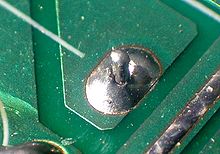 An improperly soldered 'cold' joint
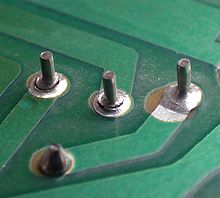 Broken solder joints on a circuit board
Currently, mass-production printed circuit boards (PCBs) are mostly wave soldered or reflow soldered,
though hand soldering of production electronics is also still standard
practice for many tasks. In wave soldering, parts are temporarily
adhered to the PCB with small dabs of adhesive, then the assembly is
passed over flowing solder in a bulk container. Reflow soldering is a
process in which a solder paste (a mixture of prealloyed solder powder and a flux-vehicle that has a peanut butter-like consistency[4])
is used to stick the components to their attachment pads, after which
the assembly is heated by an infrared lamp; a hot air pencil; or, more
commonly, by passing it through a carefully controlled oven. Since
different components can be best assembled by different techniques, it
is common to use two or more processes for a given PCB. For example, surface mounted parts may be reflow soldered first, with a wave soldering process for the through-hole mounted components coming next, and bulkier parts hand-soldered last.
Broken solder joints on a circuit board
Currently, mass-production printed circuit boards (PCBs) are mostly wave soldered or reflow soldered,
though hand soldering of production electronics is also still standard
practice for many tasks. In wave soldering, parts are temporarily
adhered to the PCB with small dabs of adhesive, then the assembly is
passed over flowing solder in a bulk container. Reflow soldering is a
process in which a solder paste (a mixture of prealloyed solder powder and a flux-vehicle that has a peanut butter-like consistency[4])
is used to stick the components to their attachment pads, after which
the assembly is heated by an infrared lamp; a hot air pencil; or, more
commonly, by passing it through a carefully controlled oven. Since
different components can be best assembled by different techniques, it
is common to use two or more processes for a given PCB. For example, surface mounted parts may be reflow soldered first, with a wave soldering process for the through-hole mounted components coming next, and bulkier parts hand-soldered last.
For hand soldering of electronic components, the heat source tool should be selected to provide adequate heat for the size of joint to be completed. A 100 watt soldering iron may provide too much heat for printed circuit boards, while a 25 watt iron will not provide enough heat for large electrical connectors, joining copper roof flashing, or large stained-glass lead came. Using a tool with too high a temperature can damage sensitive components, but protracted heating by a tool that is too cool or under powered can also cause extensive heat damage.
Hand-soldering techniques require a great deal of skill to use on the finest pitch chip packages. In particular ball grid array (BGA) devices are notoriously difficult if not impossible to rework by hand.
For attachment of electronic components to a PCB, proper selection and use of flux helps prevent oxidation during soldering, which is essential for good wetting and heat transfer. The soldering iron tip must be clean and pre-tinned with solder to ensure rapid heat transfer. Components which dissipate large amounts of heat during operation are sometimes elevated above the PCB to avoid PCB overheating. After inserting a through-hole mounted component, the excess lead is cut off, leaving a length of about the radius of the pad. Plastic or metal mounting clips or holders may be used with large devices to aid heat dissipation and reduce joint stresses.
A heat sink may be used on the leads of heat sensitive components to reduce heat transfer to the component. This is especially applicable to germanium parts. (Note the heat sink will mean the use of more heat to complete the joint.) If all metal surfaces are not properly fluxed and brought above the melting temperature of the solder in use, the result will be an unreliable "cold solder joint".
To simplify soldering, beginners are usually advised to apply the soldering iron and the solder separately to the joint, rather than the solder being applied direct to the iron. When sufficient solder is applied, the solder wire is removed. When the surfaces are adequately heated, the solder will flow around the joint. The iron is then removed from the joint.
Since non-eutectic solder alloys have a small plastic range, the joint must not be moved until the solder has cooled down through both the liquidus and solidus temperatures. Visually, a good solder joint will appear smooth and shiny, with the outline of the soldered wire clearly visible. A matte gray surface is a good indicator of a joint that was moved during soldering. Too little solder will result in a dry and unreliable joint; too much solder (the 'solder blob' very familiar to beginners) is not necessarily unsound, but tends to mean poor wetting. With some fluxes, flux residue remaining on the joint may need to be removed, using water, alcohol or other solvents compatible with the process. Excess solder and unconsumed flux and residue is sometimes wiped from the soldering iron tip between joints. The tip of the iron is kept wetted with solder ("tinned") when hot to minimize oxidation and corrosion of the tip itself.
Environmental legislation in many countries, and the whole of the European Community area (see RoHS), has led to a change in formulation of both solders and fluxes. Water soluble non-rosin based fluxes have been increasingly used since the 1980s so that soldered boards can be cleaned with water or water based cleaners. This eliminates hazardous solvents from the production environment, and effluent.
Pressure is applied through the whole process (usually 15 s) to ensure that components stay in place during cooling. The heating element is heated and cooled for each connection. Up to 4000 W can be used in the heating element allowing fast soldering, good results with connections requiring high energy.
Wavelengths are typically 808 nm through 980 nm. The beam is delivered via an optical fiber to the workpiece, with fiber diameters 800 um and smaller. Since the beam out of the end of the fiber diverges rapidly, lenses are used to create a suitable spot size on the workpiece at a suitable working distance. A wire feeder is used to supply solder.
Both lead-tin and silver-tin material can be soldered. Process recipes will differ depending on the alloy composition. For soldering 44-pin chip carriers to a board using soldering preforms, power levels were on the order of 10 Watts and solder times approximately 1 second. Low power levels can lead to incomplete wetting and the formation of voids, both of which can weaken the joint.
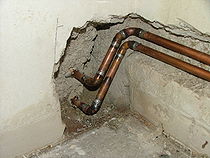 soldered copper pipes
 Solder
Copper pipe, or 'tube', is commonly joined by soldering. When applied
in a plumbing trade context, soldering is more often referred to as sweating and a tubing connection so made is referred to as a sweated joint.
Solder
Copper pipe, or 'tube', is commonly joined by soldering. When applied
in a plumbing trade context, soldering is more often referred to as sweating and a tubing connection so made is referred to as a sweated joint.
Copper conducts heat away much faster than a soldering iron or gun can provide, so a propane torch is most commonly used to deliver the necessary BTUs per minute; for large tubing sizes and fittings a MAPP†-fueled, acetylene-fueled, or propylene-fueled torch is used with atmospheric air as the oxidizer; MAPP†/oxygen or acetylene/oxygen are rarely used because the flame temperature is much higher than the melting point of copper. Too much heat destroys the temper of hard-tempered copper tubing, and can burn the flux out of a joint before the solder is added, resulting in a faulty joint. For larger tubing sizes, a torch fitted with various sizes of interchangeable swirl tips is employed to deliver the needed BTUs/minute.
Most experienced plumbers seldom use propane fuel. In the hands of a skilled tradesman, the hotter flame of acetylene, MAPP, or propylene allows more joints to be completed per hour.
†True MAPP gas has not been produced or sold in North American since 2008 when the last plant producing the fuel closed. The yellow canisters available in hardware stores, while labeled MAPP, are MAPP substitutes that burns at a somewhat cooler temperature.
Solder fittings, which are short sections of smooth pipe designed to slide over the outside of the mating tube, are usually used for copper joints. There are two types of fittings: end feed fittings which contain no solder, and solder ring fittings, in which there is a ring of solder in a small circular recess inside the fitting.
As with all solder joints, all parts to be joined must be clean and oxide free. Internal and external wire brushes are available for the common pipe and fitting sizes; emery cloth and wire-wool are frequently used as well, although metal wool products are discouraged, as they can contain oil, which would contaminate the joint.
Because of the size of the parts involved, and the high activity and contaminating tendency of the flame, plumbing fluxes are typically much more chemically active, and more acidic, than electronic fluxes. Because plumbing joints may be done at any angle, even upside down, plumbing fluxes are generally formulated as pastes which stay in place better than liquids. Flux should be applied to all surfaces of the joint, inside and out. Flux residues should be removed after the joint is complete or they can, eventually, erode through the copper substrates and cause failure of the joint.
Many plumbing solder formulations are available, with different characteristics such as higher or lower melting temperature, depending on the specific requirements of the job. Building codes currently almost universally require the use of lead-free solder for potable water piping, though traditional tin-lead solder is still available. Studies have shown that lead-soldered plumbing pipes can result in elevated levels of lead in drinking water.
Since copper pipe quickly conducts heat away from a joint, great care must be taken to ensure that the joint is properly heated through to obtain a good bond. After the joint is properly cleaned, fluxed and fitted, the torch flame is applied to the thickest part of the joint, typically the fitting with the pipe inside it, with the solder applied at the gap between the tube and the fitting. When all the parts are heated through, the solder will melt and flow into the joint by capillary action. The torch may need to be moved around the joint to ensure all areas are wetted out. However, the installer must take care to not overheat the areas being soldered. If the tube begins to discolor it means that the tube has been over-heated and is beginning to oxidize, stopping the flow of the solder and causing the soldered joint not to seal properly. Before oxidation the molten solder will follow the heat of the torch around the joint. When the joint is properly wetted out, the solder and then the heat are removed, and while the joint is still very hot, it is usually wiped with a dry rag. This removes excess solder as well as flux residue before it cools down and hardens. With a solder ring joint, the joint is heated until a ring of molten solder is visible around the edge of the fitting and allowed to cool.
Solder connections are usually considered the most difficult of the three methods of connecting copper tubing, but soldering copper is a very simple process, provided some basic conditions are provided:
The American welding society defines brazing as using filler metals with melting points over 450 °C (842 °F) — or, by the traditional definition in the United States, above 800 °F (427 °C). Aluminium soldering alloys generally have melting temperatures around 730 °F (388 °C). This soldering / brazing operation can use a propane torch heat source
These materials are often advertised as "aluminium welding", but the process does not involve melting the base metal, and therefore is not properly a weld.
United States Military Standard or MIL-SPEC specification MIL-R-4208 defines one standard for these zinc-based brazing/soldering alloys A number of products meet this specification. or very similar performance standards
Resistance soldering is soldering in which the heat required to flow the solder is created by passing an electric current through the solder. When current is conducted through a resistive material a certain level of heat is generated. By regulating the amount of current conducted and the level of resistance encountered, the amount of heat produced can be predetermined and controlled.
Electrical resistance (usually described as a material's opposition to the flow of an electric current) is used to convert electric energy into thermal energy as an electric current (I) conducted through a material with resistance (R) releases power (P) equal to: P = I² R, where P is the power measured in watts, I is the current measured in amperes and R is the resistance measured in ohms.
More recently, electrically heated soldering irons are used. These are heated by a coil or ceramic heating element inside the tip of the iron. Different power ratings are available, and temperature can be controlled electronically. These characteristics allow longer beads to be run without interrupting the work to change tips. Soldering irons designed for electronic use are often effective though they are sometimes underpowered for the heavy copper and lead came used in stained glass work. Oleic acid is the classic flux material that has been used to improve solderability.
Tiffany type stainglass steel is made by gluing copper foil around the edges of the pieces of glass and then soldering them together. This method makes it possible to create three dimensional stained glass pieces.
It is good practice to remove solder from a joint prior to resoldering—desoldering braids or vacuum desoldering equipment (solder suckers) can be used. Desoldering wicks contain plenty of flux that will lift the contamination from the copper trace and any device leads that are present. This will leave a bright, shiny, clean junction to be resoldered.
The lower melting point of solder means it can be melted away from the base metal, leaving it mostly intact, though the outer layer will be "tinned" with solder. Flux will remain which can easily be removed by abrasive or chemical processes. This tinned layer will allow solder to flow into a new joint, resulting in a new joint, as well as making the new solder flow very quickly and easily.
A eutectic formulation has several advantages for soldering; chief among these is the coincidence of the liquidus and solidus temperatures, i.e. the absence of a plastic phase. This allows for quicker wetting as the solder heats up, and quicker setup as the solder cools. A non-eutectic formulation must remain still as the temperature drops through the liquidus and solidus temperatures. Any differential movement during the plastic phase may result in cracks, giving an unreliable joint. Additionally, a eutectic formulation has the lowest possible melting point, which minimizes heat stress on electronic components during soldering.
Common solder alloys are mixtures of tin and lead, respectively:
- 63/37: melts at 183 °C (361 °F) (eutectic: the only mixture that melts at a point, instead of over a range)
- 60/40: melts between 183–190 °C (361–374 °F)
- 50/50: melts between 185–215 °C (365–419 °F)
Other common solders include low-temperature formulations (often containing bismuth), which are often used to join previously-soldered assemblies without un-soldering earlier connections, and high-temperature formulations (usually containing silver) which are used for high-temperature operation or for first assembly of items which must not become unsoldered during subsequent operations. Alloying silver with other metals changes the melting point, adhesion and wetting characteristics, and tensile strength. Of all the brazing alloys, brazing has the greatest strength, with silver solders not being substantially stronger than soft solder and having the broadest applications. Specialty alloys are available with properties such as higher strength, better electrical conductivity and higher corrosion resistance.
Flux
Main article: flux (metallurgy)
The purpose of flux
is to facilitate the soldering process. The obstacle to a successful
solder joint is an impurity at the site of the union, e.g. dirt, oils or
oxidation.
The impurities can be removed by mechanical cleaning or by chemical
means, but the elevated temperatures required to melt the filler metal
(the solder) encourages the work piece (and the solder) to re-oxidize.
This effect is accelerated as the soldering temperatures increase and
can completely prevent the solder from joining to the workpiece. One of
the earliest forms of flux was charcoal, which acts as a reducing agent
and helps prevent oxidation during the soldering process. Some fluxes
go beyond the simple prevention of oxidation and also provide some form
of chemical cleaning (corrosion).For many years, the most common type of flux used in electronics (soft soldering) was rosin-based, using the rosin from selected pine trees. It was ideal in that it was non-corrosive and non-conductive at normal temperatures but became mildly reactive (corrosive) at the elevated soldering temperatures. Plumbing and automotive applications, among others, typically use an acid-based (muriatic acid) flux which provides cleaning of the joint. These fluxes cannot be used in electronics because they are conductive and because they will eventually dissolve the small diameter wires. Many fluxes also act as a wetting agent in the soldering process, reducing the surface tension of the molten solder and causing it to flow and wet the workpieces more easily.
Fluxes for soft solder are currently available in three basic formulations:
- Water-soluble fluxes (no VOCs required for removal) are higher activity fluxes designed to be removed with water after soldering.
- No-clean fluxes which are mild enough to not "require" removal due to the non-conductive and non-corrosive residue. Performance of the flux needs to be carefully evaluated; a very mild 'no-clean' flux might be perfectly acceptable for production equipment, but not give adequate performance for a poorly controlled hand-soldering operation. They are so-called "no-clean" because the residue left after the solder operation is non-conductive and won't cause electrical shorts; nevertheless these fluxes leave a white-color residue like dilute bird-droppings. which is plainly visible. Since the presence of foreign matter, detritus, even lint, on circuit boards is a defect for all three classes of electronic circuit boards (ranging from cheap consumer electronics to high-reliability, mission critical applications), these sorts of fluxes must still be cleaned as with all hand solder work, typically brushing with 99% isopropyl alcohol as the solvent and lint-free non-synthetic (eg cotton) wipes.
- Traditional rosin fluxes are available in non-activated (R), mildly activated (RMA) and activated (RA) formulations. RA and RMA fluxes contain rosin combined with an activating agent, typically an acid, which increases the wettability of metals to which it is applied by removing existing oxides. The residue resulting from the use of RA flux is corrosive and must be cleaned off the piece being soldered. RMA flux is formulated to result in a residue which is not significantly corrosive, with cleaning being preferred but optional.
Processes
There are three forms of soldering, each requiring progressively higher temperatures and producing an increasingly stronger joint strength:- Soft soldering, which originally used a tin-lead alloy as the filler metal,
- silver soldering, which uses an alloy containing silver,
- brazing which uses a brass alloy for the filler.
Soft soldering is characterized by having a melting point of the filler metal below approximately 400 °C (752 °F), whereas silver soldering and brazing use higher temperatures, typically requiring a flame or carbon arc torch to achieve the melting of the filler. Soft solder filler metals are typically alloys (often containing lead) that have liquidus temperatures below 350°C.
In this soldering process, heat is applied to the parts to be joined, causing the solder to melt and to bond to the workpieces in an alloying process called wetting. In stranded wire, the solder is drawn up into the wire by capillary action in a process called 'wicking'. Capillary action also takes place when the workpieces are very close together or touching. The joint strength is dependent on the filler metal used. Soldering produces electrically-conductive, water- and gas-tight joints.
Each type of solder offers advantages and disadvantages. Soft solder is so called because of the the soft lead that is its primary ingredient.Soft soldering uses the lowest temperatures but does not make a strong join and is unsuitable for mechanical load-bearing applications. It is also unsuitable for high-temperature applications as it softens and melts. Silver soldering, as used by jewelers, machinists and in some plumbing applications, requires the use of a torch or other high-temperature source, and is much stronger than soft soldering. Brazing provides the strongest joint but also requires the hottest temperatures to melt the filler metal, requiring a torch or other high temperature source and darkened goggles to protect the eyes from the bright light produced by the white-hot work. It is often used to repair cast-iron objects, wrought-iron furniture, etc.
Soldering operations can be performed with hand tools, one joint at a time, or en masse on a production line. Hand soldering is typically performed with a soldering iron, soldering gun, or a torch, or occasionally a hot-air pencil. Sheetmetal work was traditionally done with "soldering coppers" directly heated by a flame, with sufficient stored heat in the mass of the soldering copper to complete a joint; torches or electrically-heated soldering irons are more convenient. All soldered joints require the same elements of cleaning of the metal parts to be joined, fitting up the joint, heating the parts, applying flux, applying the filler, removing heat and holding the assembly still until the filler metal has completely solidified. Depending on the nature of flux material used, cleaning of the joints may be required after they have cooled.
Each alloy has characteristics that work best for certain applications, notably strength and conductivity, and each type of solder and alloy has different melting temperatures. The term silver solder likewise denotes the type of solder that is used. Some soft solders are "silver bearing" alloys used to solder silver-plated items. Lead based solders should not be used on precious metals because the lead dissolves the metal and disfigures it.
Soldering and brazing
The distinction between soldering and brazing is based on the melting temperature of the filler alloy. A temperature of 450 °C is usually used as a practical delineating point between soldering and brazing . Soft soldering can be done with a heated iron whereas the other methods require a higher temperature torch or furnace to melt the filler metal.Different equipment is usually required since a soldering iron cannot achieve high enough temperatures for hard soldering or brazing. Brazing filler metal is stronger than silver solder, which is stronger than lead-based soft solder. Brazing solders are formulated primarily for strength, silver solder is used by jewelers to protect the precious metal and by machinists and refrigeration technicians for its strength but lower melting temperature than brazing, and the primary benefit of soft solder is the low temperature used (to prevent heat damage to electronic components and insulation).
Since the joint is produced using a metal with a lower melting temperature than the workpiece, the joint will weaken as the ambient temperature approaches the melting point of the filler metal. For that reason, the higher temperature processes produce joints which are effective at higher temperatures. Brazed connections can be as strong or nearly as strong as the parts they connect, even at elevated temperatures.
Silver soldering
"Hard soldering" or "silver soldering" is used to join precious and semi-precious metals such as gold, silver, brass, and copper. The solder is usually referred to as esay, medium, or hard. This refers to its melting temperature, not the strength of the joint. Extra-easy solder contains 56% silver and has a melting point of 1,145 °F (618 °C). Extra-hard solder has 80% silver and melts at 1,370 °F (740 °C). If multiple joints are needed, then the jeweler will start with hard or extra-hard solder and switch to lower temperature solders for later joints.Silver solder is absorbed by the surrounding metal, resulting in a joint that is actually stronger than the metal being joined. The metal being joined must be perfectly flush, as silver solder cannot normally be used as a filler and any gaps will remain.
Another difference between brazing and soldering is how the solder is applied. In brazing, one generally uses rods that are touched to the joint while being heated. With silver soldering, small pieces of solder wire are placed onto the metal prior to heating. A flux, often made of borax and water, is used to keep the metal and solder clean and to prevent the solder from moving before it melts.
When silver solder melts, it tends to flow towards the area of greatest heat. Jewelers can somewhat control the direction the solder moves by leading it with a torch; it will even run straight up along a seam.
Induction soldering
Induction soldering uses induction heating by high-frequency AC current in a surrounding copper coil. This induces currents in the part being soldered, heat then being generated by resistive heating. The copper rings can be made to fit the part needed to be soldered for precision in the work piece. Induction soldering is a process in which a filler metal (solder) is placed between the facing surfaces of (to be joined) metals. The filler metal in this process is melted at a fairly low temperature. Fluxes are commonly used in induction soldering. This is a process which is particularly suitable for soldering continuously. The process is usually done with coils that wrap around a cylinder/pipe that needs to be soldered.Some metals are easier to solder than others. Copper, silver, and gold are easy. Iron, mild steel and nickel are found to be more difficult. Because of their thin, strong oxide films, stainless steel and aluminium are even more difficult. Titanium, magnesium, cast irons, some high-carbon steels, ceramics, and graphite can be soldered but it involves a process similar to joining carbides. They are first plated with a suitable metallic element that induces interfacial bonding.
Electronic components (PCBs)


For hand soldering of electronic components, the heat source tool should be selected to provide adequate heat for the size of joint to be completed. A 100 watt soldering iron may provide too much heat for printed circuit boards, while a 25 watt iron will not provide enough heat for large electrical connectors, joining copper roof flashing, or large stained-glass lead came. Using a tool with too high a temperature can damage sensitive components, but protracted heating by a tool that is too cool or under powered can also cause extensive heat damage.
Hand-soldering techniques require a great deal of skill to use on the finest pitch chip packages. In particular ball grid array (BGA) devices are notoriously difficult if not impossible to rework by hand.
For attachment of electronic components to a PCB, proper selection and use of flux helps prevent oxidation during soldering, which is essential for good wetting and heat transfer. The soldering iron tip must be clean and pre-tinned with solder to ensure rapid heat transfer. Components which dissipate large amounts of heat during operation are sometimes elevated above the PCB to avoid PCB overheating. After inserting a through-hole mounted component, the excess lead is cut off, leaving a length of about the radius of the pad. Plastic or metal mounting clips or holders may be used with large devices to aid heat dissipation and reduce joint stresses.
A heat sink may be used on the leads of heat sensitive components to reduce heat transfer to the component. This is especially applicable to germanium parts. (Note the heat sink will mean the use of more heat to complete the joint.) If all metal surfaces are not properly fluxed and brought above the melting temperature of the solder in use, the result will be an unreliable "cold solder joint".
To simplify soldering, beginners are usually advised to apply the soldering iron and the solder separately to the joint, rather than the solder being applied direct to the iron. When sufficient solder is applied, the solder wire is removed. When the surfaces are adequately heated, the solder will flow around the joint. The iron is then removed from the joint.
Since non-eutectic solder alloys have a small plastic range, the joint must not be moved until the solder has cooled down through both the liquidus and solidus temperatures. Visually, a good solder joint will appear smooth and shiny, with the outline of the soldered wire clearly visible. A matte gray surface is a good indicator of a joint that was moved during soldering. Too little solder will result in a dry and unreliable joint; too much solder (the 'solder blob' very familiar to beginners) is not necessarily unsound, but tends to mean poor wetting. With some fluxes, flux residue remaining on the joint may need to be removed, using water, alcohol or other solvents compatible with the process. Excess solder and unconsumed flux and residue is sometimes wiped from the soldering iron tip between joints. The tip of the iron is kept wetted with solder ("tinned") when hot to minimize oxidation and corrosion of the tip itself.
Environmental legislation in many countries, and the whole of the European Community area (see RoHS), has led to a change in formulation of both solders and fluxes. Water soluble non-rosin based fluxes have been increasingly used since the 1980s so that soldered boards can be cleaned with water or water based cleaners. This eliminates hazardous solvents from the production environment, and effluent.
Hot-bar reflow
Hot-bar reflow is a selective soldering process where two pre-fluxed, solder coated parts are heated with heating element (called a thermode) to a sufficient temperature to melt the solder.Pressure is applied through the whole process (usually 15 s) to ensure that components stay in place during cooling. The heating element is heated and cooled for each connection. Up to 4000 W can be used in the heating element allowing fast soldering, good results with connections requiring high energy.
] Laser
Laser soldering is a technique where a ~30-50 W laser is used to melt and solder an electrical connection joint. Diode laser systems based on semiconductor junctions are used for this purpose.Wavelengths are typically 808 nm through 980 nm. The beam is delivered via an optical fiber to the workpiece, with fiber diameters 800 um and smaller. Since the beam out of the end of the fiber diverges rapidly, lenses are used to create a suitable spot size on the workpiece at a suitable working distance. A wire feeder is used to supply solder.
Both lead-tin and silver-tin material can be soldered. Process recipes will differ depending on the alloy composition. For soldering 44-pin chip carriers to a board using soldering preforms, power levels were on the order of 10 Watts and solder times approximately 1 second. Low power levels can lead to incomplete wetting and the formation of voids, both of which can weaken the joint.
Pipe soldering


Copper conducts heat away much faster than a soldering iron or gun can provide, so a propane torch is most commonly used to deliver the necessary BTUs per minute; for large tubing sizes and fittings a MAPP†-fueled, acetylene-fueled, or propylene-fueled torch is used with atmospheric air as the oxidizer; MAPP†/oxygen or acetylene/oxygen are rarely used because the flame temperature is much higher than the melting point of copper. Too much heat destroys the temper of hard-tempered copper tubing, and can burn the flux out of a joint before the solder is added, resulting in a faulty joint. For larger tubing sizes, a torch fitted with various sizes of interchangeable swirl tips is employed to deliver the needed BTUs/minute.
Most experienced plumbers seldom use propane fuel. In the hands of a skilled tradesman, the hotter flame of acetylene, MAPP, or propylene allows more joints to be completed per hour.
†True MAPP gas has not been produced or sold in North American since 2008 when the last plant producing the fuel closed. The yellow canisters available in hardware stores, while labeled MAPP, are MAPP substitutes that burns at a somewhat cooler temperature.
Solder fittings, which are short sections of smooth pipe designed to slide over the outside of the mating tube, are usually used for copper joints. There are two types of fittings: end feed fittings which contain no solder, and solder ring fittings, in which there is a ring of solder in a small circular recess inside the fitting.
As with all solder joints, all parts to be joined must be clean and oxide free. Internal and external wire brushes are available for the common pipe and fitting sizes; emery cloth and wire-wool are frequently used as well, although metal wool products are discouraged, as they can contain oil, which would contaminate the joint.
Because of the size of the parts involved, and the high activity and contaminating tendency of the flame, plumbing fluxes are typically much more chemically active, and more acidic, than electronic fluxes. Because plumbing joints may be done at any angle, even upside down, plumbing fluxes are generally formulated as pastes which stay in place better than liquids. Flux should be applied to all surfaces of the joint, inside and out. Flux residues should be removed after the joint is complete or they can, eventually, erode through the copper substrates and cause failure of the joint.
Many plumbing solder formulations are available, with different characteristics such as higher or lower melting temperature, depending on the specific requirements of the job. Building codes currently almost universally require the use of lead-free solder for potable water piping, though traditional tin-lead solder is still available. Studies have shown that lead-soldered plumbing pipes can result in elevated levels of lead in drinking water.
Since copper pipe quickly conducts heat away from a joint, great care must be taken to ensure that the joint is properly heated through to obtain a good bond. After the joint is properly cleaned, fluxed and fitted, the torch flame is applied to the thickest part of the joint, typically the fitting with the pipe inside it, with the solder applied at the gap between the tube and the fitting. When all the parts are heated through, the solder will melt and flow into the joint by capillary action. The torch may need to be moved around the joint to ensure all areas are wetted out. However, the installer must take care to not overheat the areas being soldered. If the tube begins to discolor it means that the tube has been over-heated and is beginning to oxidize, stopping the flow of the solder and causing the soldered joint not to seal properly. Before oxidation the molten solder will follow the heat of the torch around the joint. When the joint is properly wetted out, the solder and then the heat are removed, and while the joint is still very hot, it is usually wiped with a dry rag. This removes excess solder as well as flux residue before it cools down and hardens. With a solder ring joint, the joint is heated until a ring of molten solder is visible around the edge of the fitting and allowed to cool.
Solder connections are usually considered the most difficult of the three methods of connecting copper tubing, but soldering copper is a very simple process, provided some basic conditions are provided:
- The tubing and fittings must be cleaned to bare metal with no tarnish
- Any pressure which is formed by heating of the tubing must have an outlet
Mechanical and aluminium soldering
A number of solder materials, primarily zinc alloys, are used for soldering aluminium metal and alloys and to some lesser extent steel and zinc. This mechanical soldering is similar to a low temperature brazing operation, in that the mechanical characteristics of the joint are reasonably good and it can be used for structural repairs of those materials.The American welding society defines brazing as using filler metals with melting points over 450 °C (842 °F) — or, by the traditional definition in the United States, above 800 °F (427 °C). Aluminium soldering alloys generally have melting temperatures around 730 °F (388 °C). This soldering / brazing operation can use a propane torch heat source
These materials are often advertised as "aluminium welding", but the process does not involve melting the base metal, and therefore is not properly a weld.
United States Military Standard or MIL-SPEC specification MIL-R-4208 defines one standard for these zinc-based brazing/soldering alloys A number of products meet this specification. or very similar performance standards
Resistance soldering is soldering in which the heat required to flow the solder is created by passing an electric current through the solder. When current is conducted through a resistive material a certain level of heat is generated. By regulating the amount of current conducted and the level of resistance encountered, the amount of heat produced can be predetermined and controlled.
Electrical resistance (usually described as a material's opposition to the flow of an electric current) is used to convert electric energy into thermal energy as an electric current (I) conducted through a material with resistance (R) releases power (P) equal to: P = I² R, where P is the power measured in watts, I is the current measured in amperes and R is the resistance measured in ohms.
Resistance soldering
Resistance soldering is unlike using a conduction iron, where heat is produced within an element and then passed through a thermally conductive tip into the joint area. A cold soldering iron requires time to reach working temperature and must be kept hot between solder joints. Thermal transfer may be inhibited if the tip is not kept properly wetted during use. With resistance soldering an intense heat can be rapidly developed directly within the joint area and in a tightly controlled manner. This allows a faster ramp up to the required solder melt temperature and minimizes thermal travel away from the solder joint, which helps to minimize the potential for thermal damage to materials or components in the surrounding area. Heat is only produced while each joint is being made, making resistance soldering more energy efficient. Resistance soldering equipment, unlike conduction irons, can be used for difficult soldering and brazing applications where significantly higher temperatures may be required. This makes resistance comparable to flame soldering in some situations. When the required temperature can be achieved by either flame or resistance methods the resistance heat is more localized because of direct contact, whereas the flame will spread thus heating a potentially larger area.Stained glass soldering
Historically, stained glass soldering tips were copper, heated by being placed in a charcoal-burning brazier. Multiple tips were used; when one tip cooled down from use, it was placed back in the brazier of charcoal and the next tip was used.More recently, electrically heated soldering irons are used. These are heated by a coil or ceramic heating element inside the tip of the iron. Different power ratings are available, and temperature can be controlled electronically. These characteristics allow longer beads to be run without interrupting the work to change tips. Soldering irons designed for electronic use are often effective though they are sometimes underpowered for the heavy copper and lead came used in stained glass work. Oleic acid is the classic flux material that has been used to improve solderability.
Tiffany type stainglass steel is made by gluing copper foil around the edges of the pieces of glass and then soldering them together. This method makes it possible to create three dimensional stained glass pieces.
Solderability
Main article: Solderability
The Solderability of a substrate is a measure of the ease with which a soldered joint can be made to that material.Desoldering and resoldering
Main article: Desoldering
Used solder contains some of the dissolved base metals and is
unsuitable for reuse in making new joints. Once the solder's capacity
for the base metal has been achieved it will no longer properly bond
with the base metal, usually resulting in a brittle cold solder joint
with a crystalline appearance.It is good practice to remove solder from a joint prior to resoldering—desoldering braids or vacuum desoldering equipment (solder suckers) can be used. Desoldering wicks contain plenty of flux that will lift the contamination from the copper trace and any device leads that are present. This will leave a bright, shiny, clean junction to be resoldered.
The lower melting point of solder means it can be melted away from the base metal, leaving it mostly intact, though the outer layer will be "tinned" with solder. Flux will remain which can easily be removed by abrasive or chemical processes. This tinned layer will allow solder to flow into a new joint, resulting in a new joint, as well as making the new solder flow very quickly and easily.